FOR CLAUDE CODE · CODEX · GEMINI · OPENCODE

Your AI limits,
always in sight.

Stop typing /status. AI Usage Bar shows your live 5-hour and weekly limits — plus the model and reasoning effort you're on — right in your Mac menu bar, a floating bar, or the Touch Bar.

Free forever · Universal (Apple Silicon & Intel) · macOS 13+ · Signed & notarized by Apple

Claude Code Codex Gemini OpenCode
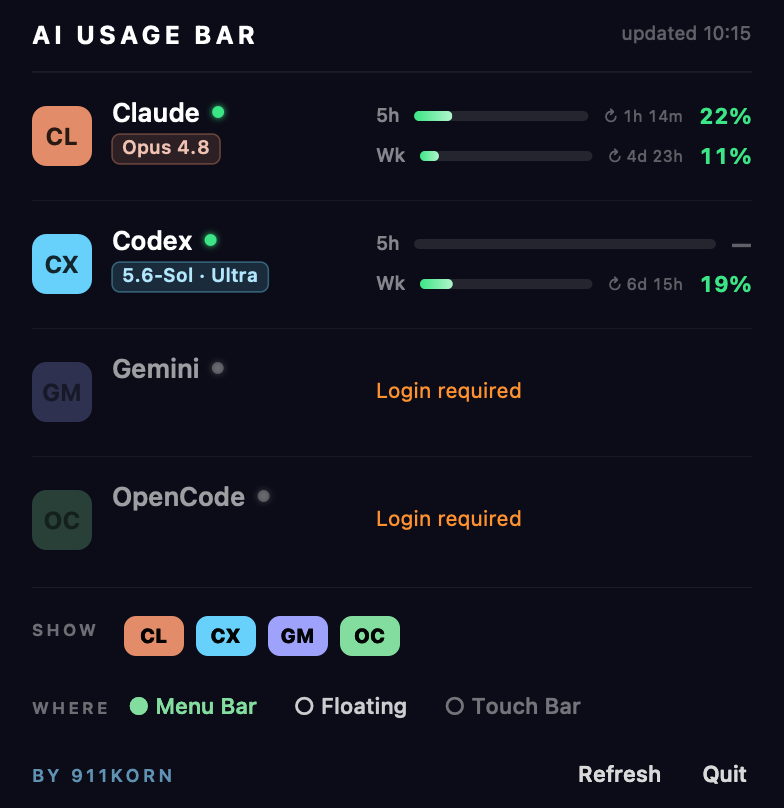
AI Usage Bar panel showing Claude, Codex, Gemini and OpenCode usage
Why you'll keep it running

Everything you check, without the check.

One glance tells you how much of your rolling limit is left, when it resets, and which model you're on — across every AI CLI you use.

Live limit bars

Real 5-hour and weekly utilization read from each provider's own usage endpoint — the same numbers as /status, updated for you automatically.

Model & effort at a glance

See exactly what you're running — Fable 5, Opus 4.8, 5.6-Sol · Ultra, Gemini 3 Pro — so you never burn a heavy tier by accident.

Resets counted down

Know precisely when your window rolls over (“↻ 1h 14m”, “6d 15h”) so you can pace long sessions instead of hitting a wall.

Pick your providers

Show only the CLIs you use. Toggle Claude, Codex, Gemini and OpenCode on or off with a click.

Choose where it lives

Menu bar, an always-on-top floating bar, or the Touch Bar — enable any combination that fits how you work.

Feather-light

A tiny native menu-bar app. No dock icon, no window clutter, negligible CPU. Launches at login and stays out of your way.
Three ways to see it

Fits every Mac.

Got a Touch Bar? Put it there. No Touch Bar? The menu bar and floating bar have you covered. Turn on whichever you like.

Menu bar level tubes

Menu bar

Compact level tubes — a filled gauge per provider, no number clutter. Click for the full panel.

Floating neon bar

Floating bar

A draggable neon strip that floats above every window — park it anywhere on screen.

Touch Bar strip

Touch Bar

On MacBook Pros with a Touch Bar, tap the Control Strip button to expand the full readout.

Private by design

Your tokens never leave your Mac.

AI Usage Bar reads the login you already have on your machine and talks only to each provider's official usage API — exactly like the CLI's own /status. Nothing is proxied, logged, or sent anywhere else.

  • No analytics, no tracking, no accounts — zero telemetry.
  • Talks only to api.anthropic.com and chatgpt.com usage endpoints.
  • Reads your own local CLI login & session files, read-only.
  • Signed & notarized by Apple — installs with no security warnings.
Sixty-second setup

Install & forget.

1

Download the installer and double-click it. It's notarized by Apple, so it opens straight to the installer — no “unidentified developer” warning.

2

Click through Continue → Install. The bar appears instantly and starts at login from then on.

3

If macOS asks once for Keychain access, click Always Allow — it's reading your Claude login to show your usage.

Questions

Good to know.

Which apps does it read? +

Claude Code, Codex, and OpenCode show live usage limits. Gemini shows your login and current model (Google's free tier is request-based rather than a published percentage). It only reads CLIs you actually have signed in — the rest simply say “Login required”.

Does it work without a Touch Bar? +

Yes. AI Usage Bar runs on every Mac (Apple Silicon and Intel, macOS 13+). The menu bar and floating bar work everywhere; the Touch Bar surface simply lights up on the Macs that have one.

Is my data safe? +

Completely. It uses the login already on your Mac and contacts only each provider's own usage endpoint — the same call the CLI makes for /status. There is no analytics, no account, and nothing leaves your machine.

Will the installer trigger a security warning? +

No. The app is signed with an Apple Developer ID and notarized by Apple, so it installs cleanly with no “unidentified developer” block.

How much does it cost? +

Nothing — AI Usage Bar is free, including updates. If it earns a spot in your menu bar, a small donation (PromptPay or card) is hugely appreciated and funds the next version. There's no nag screen and no locked features.